
Connect Odoo
Set up the Odoo integration: install the RevoSpend Agent, pair it with a code, enter your Odoo API key and choose the company to sync with.
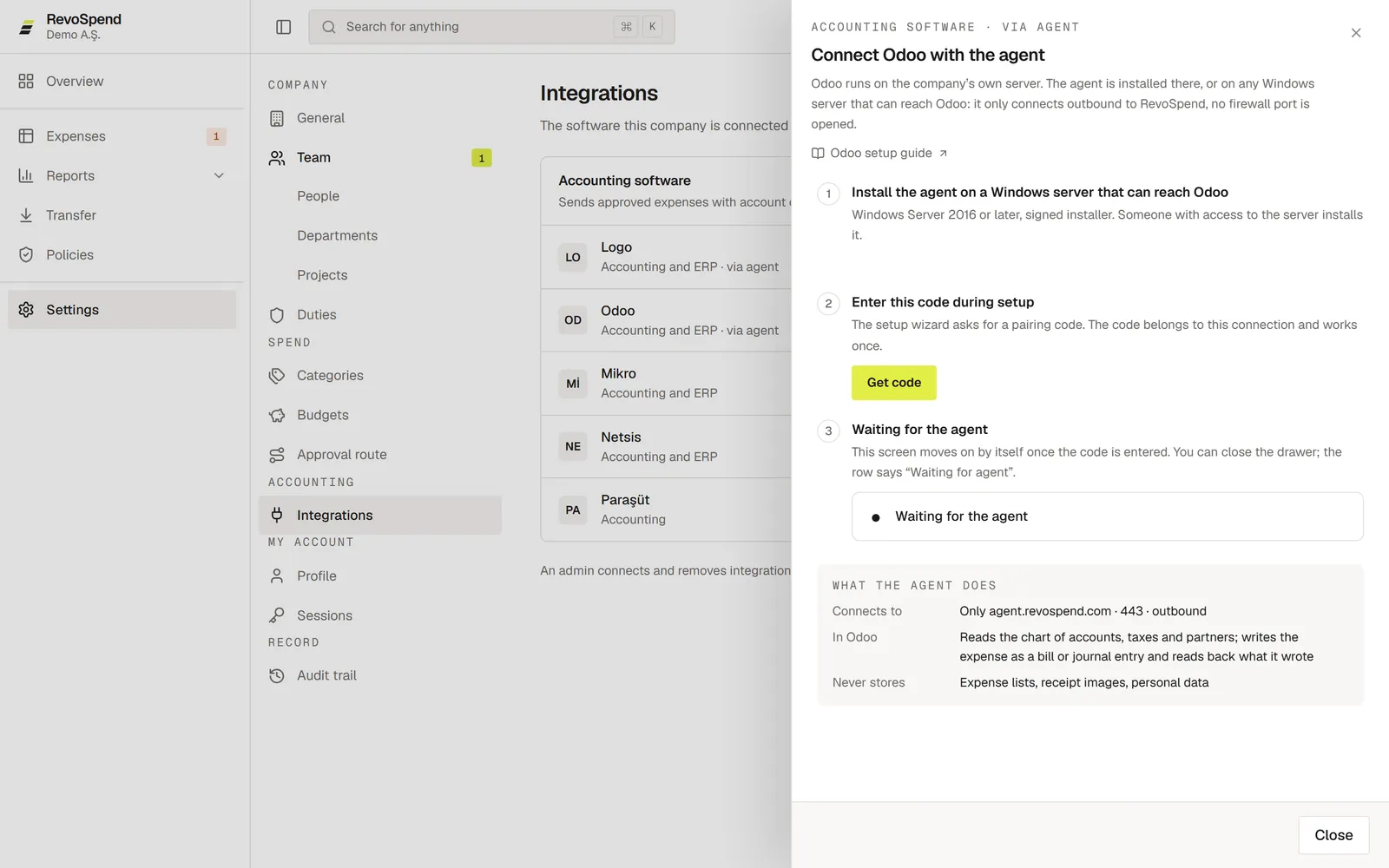
Connect Odoo and approved expenses go straight into your books — with the receipt attached and the amounts read back to confirm they match. This accounting integration keeps your chart of accounts, taxes and contacts in sync. RevoSpend reaches Odoo through the RevoSpend Agent, a small Windows service that runs next to Odoo on your own network.
Before you start
- You’re an Owner or Admin in RevoSpend, and your company is on the Team plan.
- A Windows server that can reach Odoo: Windows Server 2016 or later, at least 200 MB of free disk space, and someone with local administrator rights to install software.
- The server can make outbound HTTPS connections on port 443. No inbound port or firewall rule is needed.
- An Odoo API key. We recommend a separate Odoo user with accounting rights only.
Create the API key in Odoo first
In Odoo, go to Preferences → Account Security → New API Key. Odoo keys last at most three months — create a new one before it expires and enter it in the agent.
Open Integrations
In RevoSpend, go to Settings → Integrations and click Connect next to Odoo.
Install the agent
Click Download and run the installer on the Windows server. The installer checks the system and installs the RevoSpendAgent service.
Enter the pairing code
Back in RevoSpend, click Get code and enter the code when the installer asks for it. The code works once and for 15 minutes.
Enter Odoo’s details in the agent
In the agent’s window, click Set up program and fill in the Odoo address as seen from that server (for example
http://127.0.0.1:8069), the Database and the API key. Click Save and check.Choose the Odoo company
In RevoSpend, click Load companies, pick the company to write to and click Choose this company.
Map your accounts
Click Go to mapping to match your categories, tax rates and people to Odoo. See Map categories, taxes and people to Odoo.
Connected when every check passes
The agent shows: Odoo reached · Database found · API key valid · Companies read · Allowed to write accounting entries. In RevoSpend, Odoo shows Connected.
Security
- The agent only connects outbound, to agent.revospend.com on port 443.
- The Odoo API key is stored encrypted on your server. It never reaches RevoSpend.
- The agent never stores expense lists, receipt images or personal data. It only carries each transfer to Odoo and reports the result.
What goes where
| Data | Direction |
|---|---|
| Chart of accounts, taxes, journals, contacts | Odoo → RevoSpend |
| Approved expenses, with the receipt attached | RevoSpend → Odoo, as a vendor bill or a journal entry |
| Saved amounts | Read back from Odoo after writing; any difference is flagged |
The Odoo company is chosen once. To write to another company, click Remove connection and connect again. Expenses already transferred stay as they are.
Troubleshooting
A check fails in the agent. The checks stop at the first problem and say which one it is. See Troubleshoot the RevoSpend Agent.
The code expired. Click New code and enter the new one. Only the latest code works.
“The local agent is part of the Team plan”. Move to the Team plan in Settings → Billing → Subscription. Until then, you can transfer expenses to a file.